
Zouti Photos
macOS 15.7+ · Coming soonA power toolbox for your Photos library
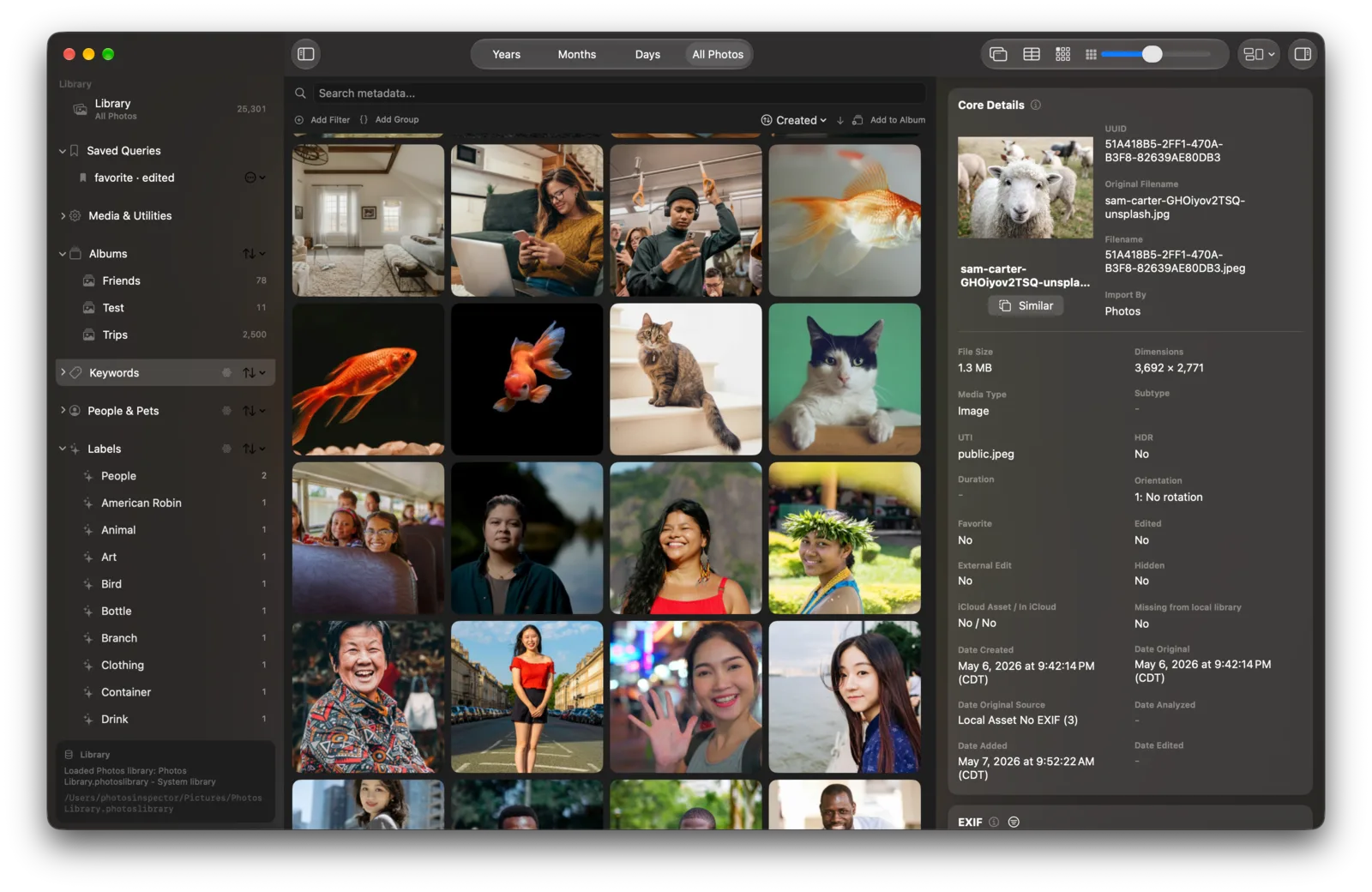
Apple Photos stores metadata that its interface doesn't show, including image labels and quality scores. Zouti Photos lets you inspect that information, combine detailed search filters, find similar photos and duplicates, and export with custom folder and filename templates.
Stay in the loop
Get Zouti Photos updates
Be the first to hear when Zouti Photos reaches the Mac App Store and the free trial is ready, plus occasional product news. You'll receive a confirmation email from Buttondown and you'll need to confirm your email before the subscription is active.
Explore, search, and work with your library
Zouti Photos reads metadata directly from your Photos library database. AI labels and scores depend on Photos' background analysis and the macOS version that created your library.
See what Photos keeps hidden
Explore dates and time zones, mapped locations, people and face geometry, camera and lens EXIF, albums, keywords, AI labels and captions, and quality scores.
Search the way you want
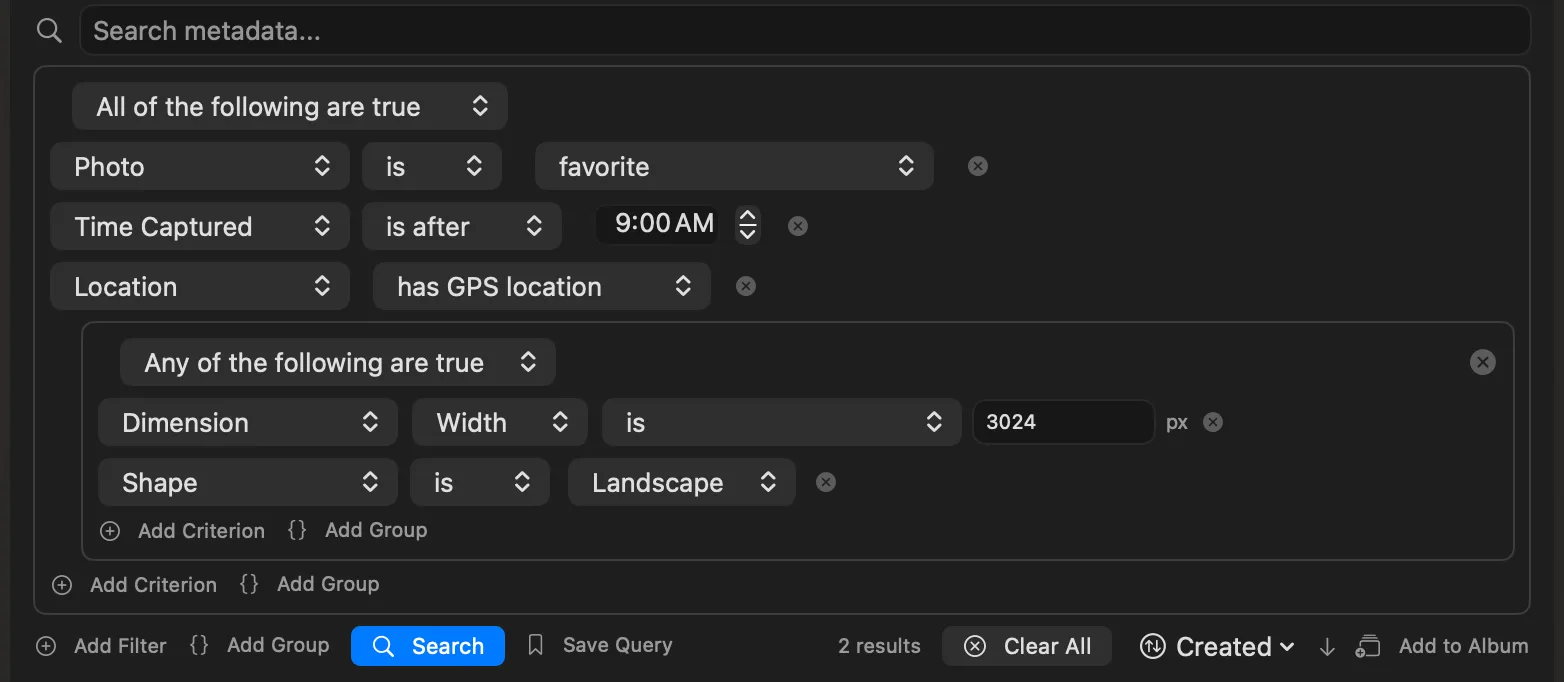
Combine nested all/any groups across dates, places, people, EXIF, media types, scores, flags, ratings, and dozens more fields. Or search filenames, captions, keywords, people, places, and Apple's AI data in one box.
Find the photos that belong together
Find lookalikes and near-duplicates with on-device image analysis, pull up photos shot near a location, or keep only the highest-scored photos from each day, month, or year.
Cull at one keystroke per photo
Mark Keep, Maybe, or Reject and let Triage Mode advance automatically. Add flags, filter the verdicts later, and use your Photos star rating on macOS 27 — all without confusing the two systems.
Edit metadata, one photo or hundreds
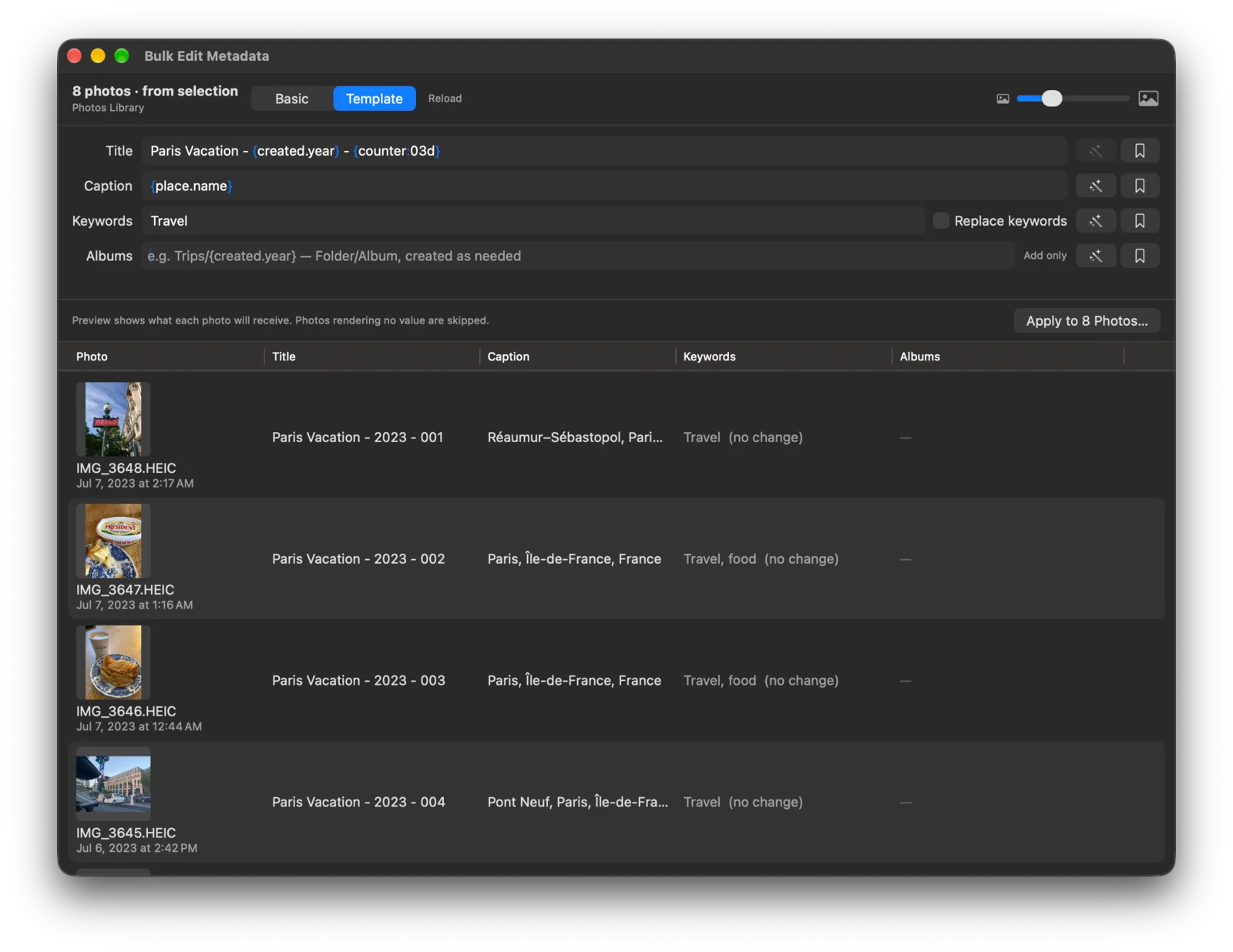
In your system Photos library, edit titles, captions, keywords, dates, locations, and favorites, plus ratings on macOS 27. Bulk-edit titles, captions, keywords, and albums in a spreadsheet, or generate values from each photo's metadata using templates.
Export files, edits, and metadata
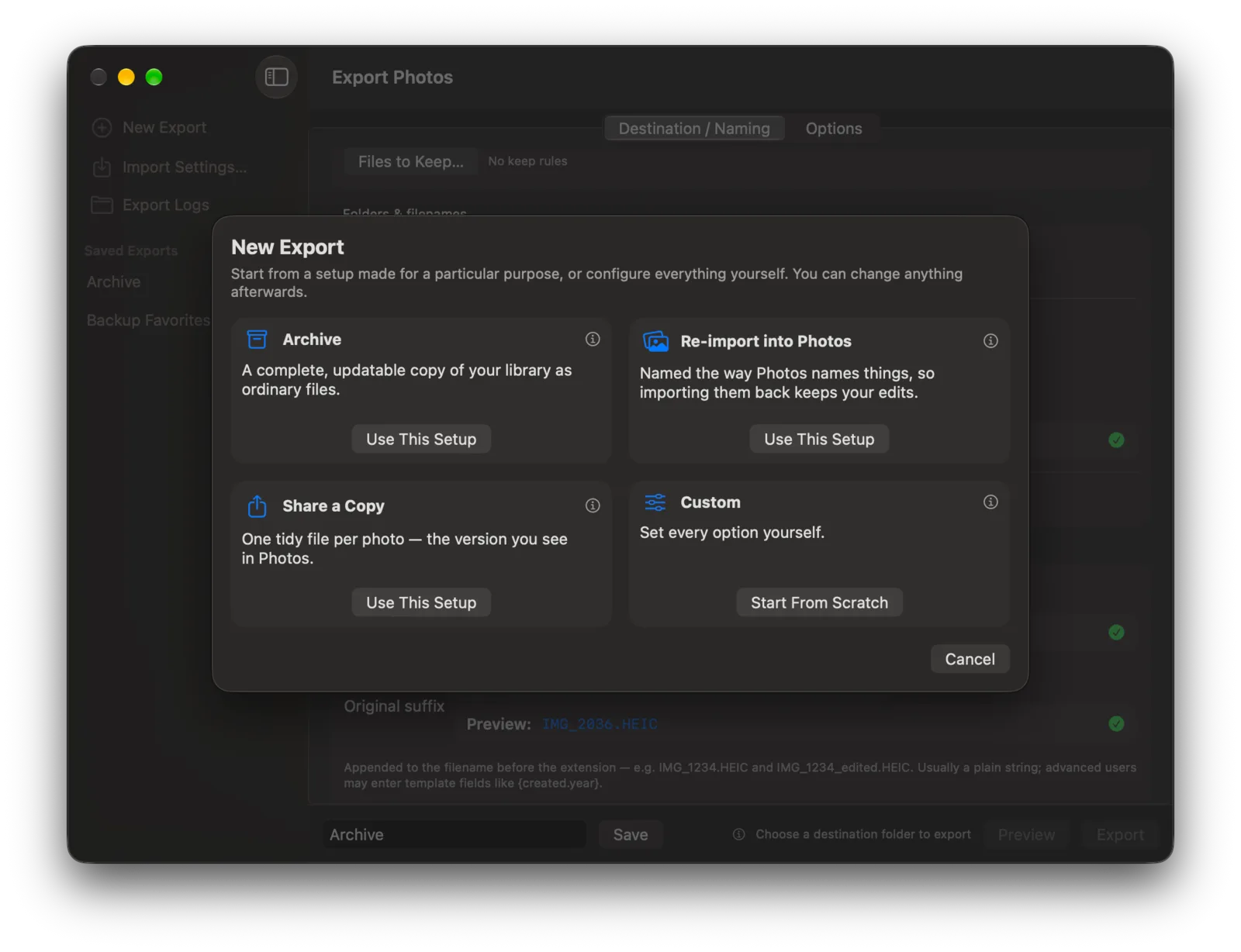
Start with a Quick Setup for an archive, a Photos re-import, or a shareable copy. Export originals, edited versions, Live Photo video, RAW, burst frames, XMP, JSON, and AAE files with a preview and report.
Turn hidden data into answers
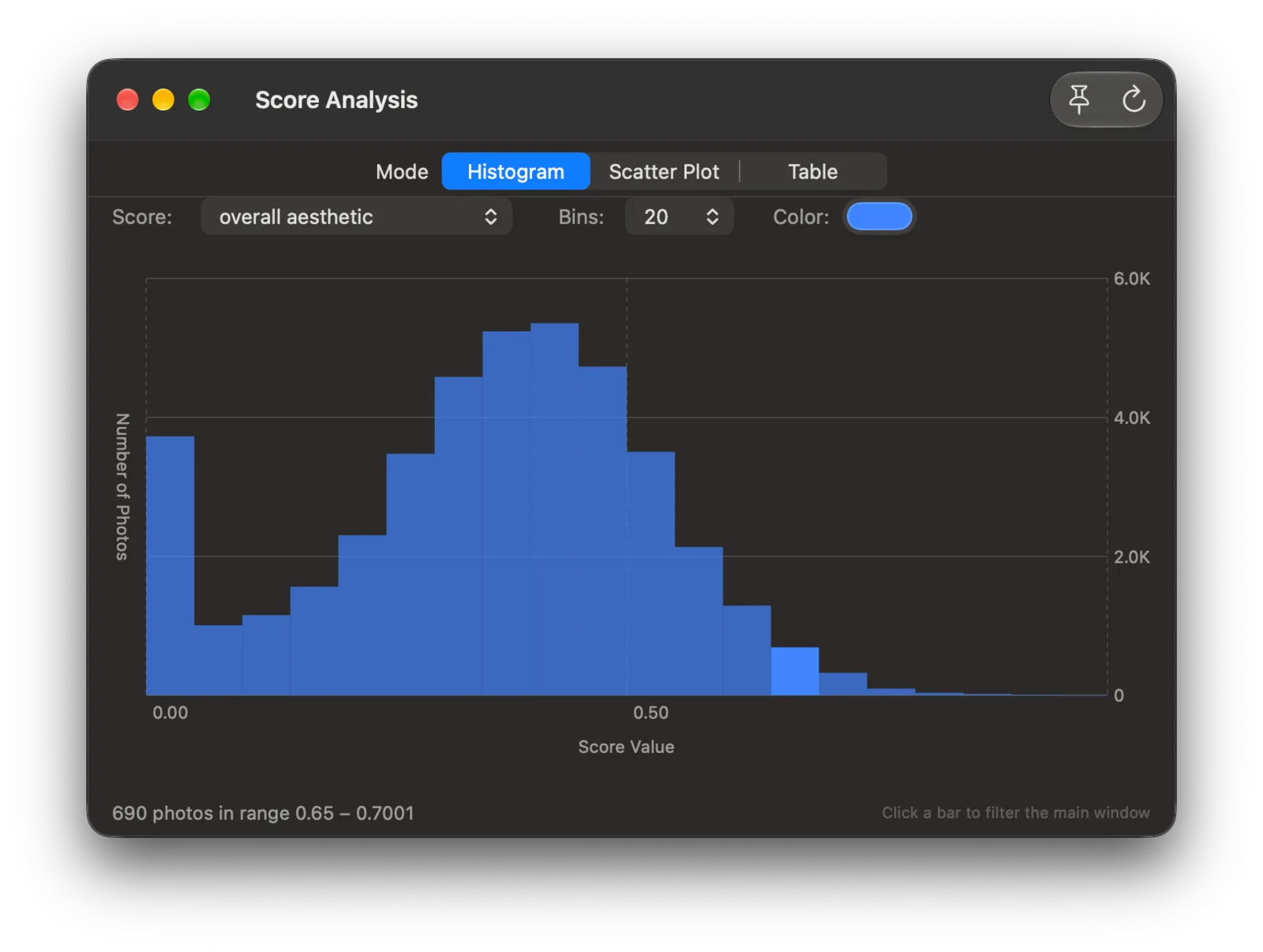
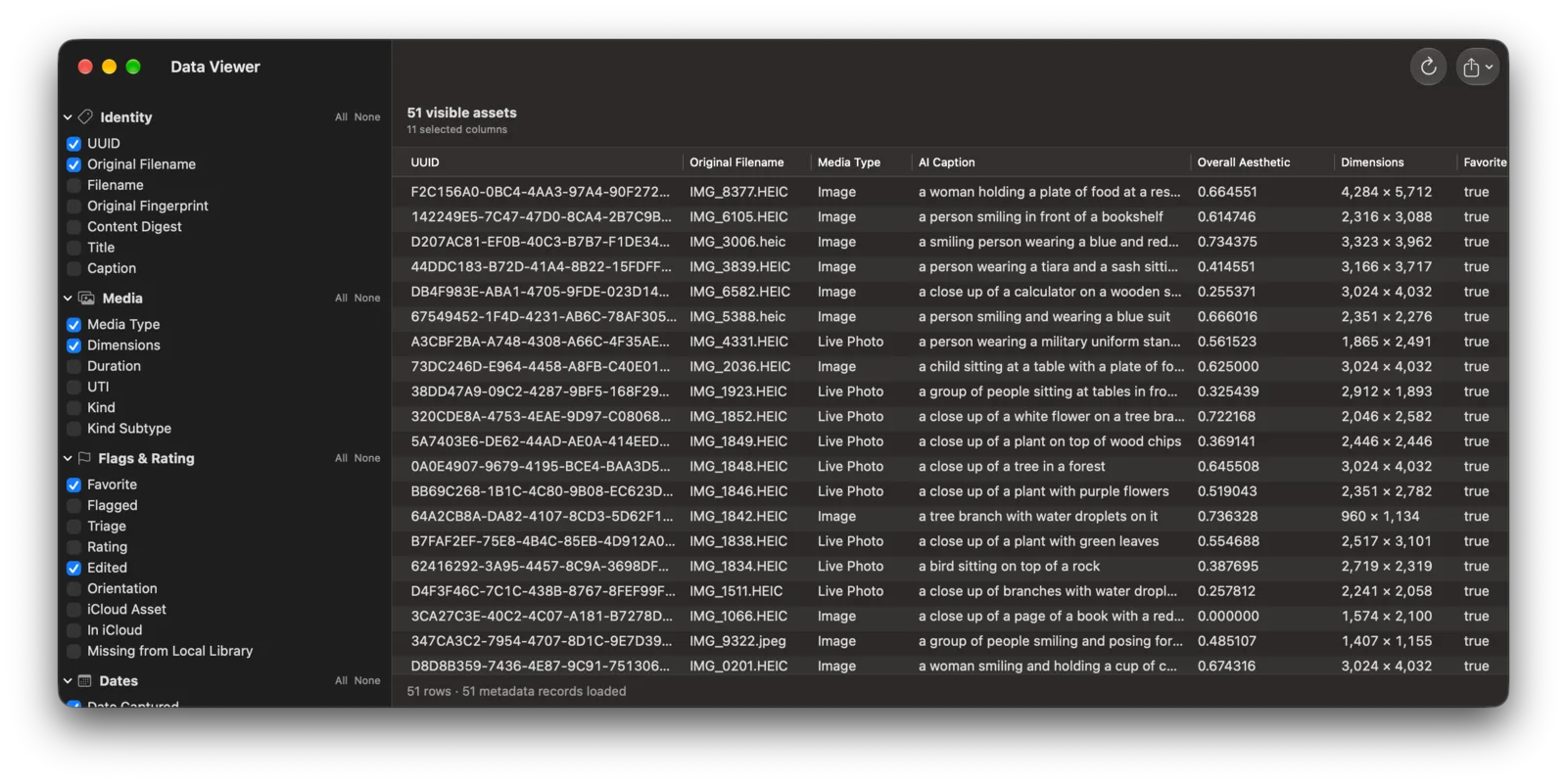
Plot quality and curation scores as histograms or scatter plots and filter straight from the chart. Open the Data Viewer for a spreadsheet of library fields, then export CSV, TSV, or JSON.
Wrangle iCloud
See at a glance which originals are only in the cloud. With your system Photos library open, download a selection or every missing original, with progress and errors reported as it goes.
Works side-by-side with Photos
With your system Photos library open, add a selection or filtered set to an album, remove photos from albums, drag thumbnails onto the sidebar, edit metadata, jump to a photo in Photos, or delete through Photos' own confirmation.
Search & filter
Ask a real question of your library
Start with free text, click any inspector value to filter by it, or build a precise query with nested groups. Save useful queries to the sidebar, share them as files, and run them again from Shortcuts or AppleScript.
- Find visually similar photos, identical original files, and Photos' duplicate groups.
- Mix dates, locations, people, EXIF, AI data, scores, flags, and rating.
- Keep the best N photos from every day, month, or year.
Organize & edit
Make a fast pass. Then fix the details.
Triage a shoot at one keystroke per photo, then update metadata in your system Photos library, one photo or a whole filtered set at a time. Changes are handed to Photos through Apple's supported interface; Zouti Photos never writes to the library database.

Export that follows your filing system
Point Zouti Photos at any selection or filtered set and describe the folders and filenames you want as templates. Dates, albums, keywords, people, places, camera, and status all become fields you can combine, filter, default, and branch on — the same ideas as the osxphotos template language, in a graphical builder with a live preview.
- Build templates with chips, or drop into text mode for filters, conditions, find/replace, and variables.
- Preview every planned source and destination before a single file is written.
- Save export configurations and re-run them later — by hand or from a script.
Folders
{created.year}/{created.month}/{album,No Album}Filename
{original_name}-{person|sort|uniq|join(-)}Preview
2026/June/Iceland/IMG_1234-Ana-Bo.HEICAnalyze & take away
Turn Photos' hidden data into something useful
Explore Apple's quality and curation scores as charts, click or drag to filter the grid, then inspect the result as a table. Choose from a deep catalog of core, location, people, EXIF, score, AI, iCloud, flag, and triage fields and export the view as CSV, TSV, or JSON.
Scriptable, and ready for your AI assistant
Run saved queries and exports from Shortcuts or AppleScript, or give an AI assistant access to the library information you choose.
Apple Shortcuts
Run saved queries and exports from Shortcuts, Siri, Spotlight, the menu bar, or a scheduled automation. Check progress, stop a run, and pass a structured export summary to the next action.
AppleScript
A full scripting dictionary: read the selection, the displayed assets, or complete asset metadata as JSON; drive the app to an album, facet, or photo; open a library, apply a saved query, and run a saved export against a destination folder — unattended.
tell application "Zouti Photos" to asset metadataJSON out means it pipes straight into jq, Python, or osxphotos.
MCP for AI assistants
Turn on the built-in Model Context Protocol server and connect Claude Desktop, Claude Code, or Codex to your library. Copy the setup for your client from the app.
- Off until you turn it on. Listens only on 127.0.0.1, behind a token you can rotate at any time.
- Control access to metadata, detected text, images, album organization, photo metadata changes, and file export separately. Only metadata access starts enabled.
- By default, each change request asks for approval and shows how many photos it affects. Choose your approval settings and review every request in the activity log.
How Zouti Photos works with your library
Zouti Photos reads and analyzes your library on your Mac. It never writes directly to the Photos database; metadata edits, album changes, and deletions go through Apple's supported Photos interface. Flags and triage verdicts stay in Zouti Photos; Photos star ratings stay in your library. If you connect an AI assistant, it can read the metadata you permit and, if you enable image access, receive copies of your photos. What it sends to its provider depends on the assistant.
Read the privacy policy →